


Office Chair Adjustments Explained - BLOG - Office Chairs & Seating
Buying Guide
Office Chair Adjustments Explained: What Each Setting Actually Does
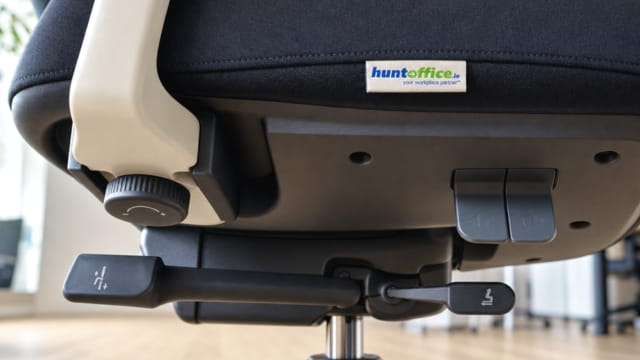
Most ergonomic chairs arrive with five or six adjustments. In practice most people only ever touch one, the seat height lever, before deciding the chair is either comfortable or isn't. The rest of the adjustments exist because seat height alone can't fix a chair that's wrong for your body. Here's what each one actually does and how to tell if yours is set correctly.
Seat height
The one adjustment almost everyone uses. Set it so your feet sit flat on the floor or on a footrest. Your knees should sit at roughly a right angle with your forearms level with the desk when typing. Too high and your feet dangle or you tilt forward to reach the desk. Too low and your knees push up above your hips. That strains the lower back over a full day.
Seat depth, or seat slide
This moves the seat pan itself forward or backward, independent of the backrest. Aim for roughly two to three fingers' width of gap between the back of your knees and the front edge of the seat. Too deep and the seat presses into the back of your knees, or you slide forward and lose lumbar contact entirely. Too shallow and your thighs aren't properly supported.
Lumbar support: height and depth
Lumbar support only works if it actually sits against the inward curve of your lower back, not your mid-back or your hips. Start with the height so the support sits at your natural waistline. Then adjust the depth, on chairs that offer it, so it presses gently against that curve rather than sitting in front of or behind it. This is the adjustment most people skip. It's also the one most linked to end-of-day back discomfort when it's wrong.
If you only fix one adjustment, fix lumbar supportSeat height problems are usually obvious within minutes. A poorly positioned lumbar support often takes hours to become uncomfortable. That's exactly why it gets left on the factory setting.
Armrests: height, width and 3D pivot
Armrest height should let your shoulders relax down. It shouldn't leave you hunched up or dropped below elbow level. Width matters for how close you can get to the desk without the arms hitting the edge. On 3D arms, the pivot and slide let the armrest angle in toward the keyboard or move out of the way entirely. This matters more for people who move between typing and other desk tasks throughout the day.
Backrest tilt and tension
Tilt tension controls how much resistance there is when you lean back. It should be set to your body weight rather than left on a default. Too loose and the chair feels unstable when you recline. Too tight and it doesn't move at all, which defeats the point of a reclining mechanism. Most ergonomic chairs also let you lock the tilt at a fixed angle if you'd rather not have it move.
Headrest, where fitted
A headrest is only useful if it actually touches the back of your head or upper neck when you're sitting upright. It shouldn't float above it or press into the top of your shoulders. It matters most when you're reclined, on a call or thinking something through away from the screen, rather than during active typing, since your neck otherwise has no support at all in that position.
Recommended settings for a full 8-hour desk day
These are sensible starting points for someone at a desk most of the working day rather than fixed rules. Adjust from here to what actually feels right for your own body and desk.
| Adjustment | Recommended for an 8-hour day |
|---|---|
| Seat height | Feet flat on the floor or a footrest, knees at roughly 90°, forearms level with the desk |
| Seat depth | Two to three fingers' gap between the back of your knees and the seat edge |
| Lumbar height | Support sits at your natural waistline, not your mid-back |
| Lumbar depth | Firm but not forcing you forward off the backrest |
| Armrest height | Shoulders relaxed down, elbows close to a right angle |
| Armrest width and pivot | Close enough to the desk that arms don't reach outward to type |
| Tilt tension | Set to your body weight, enough resistance to recline without feeling unstable |
| Headrest | Touching the back of the head or upper neck when upright, used mainly when reclined |
The best adjustment for an 8-hour day is still movementEven a well-adjusted chair is built to support sitting rather than to make sitting still for 8 hours a good idea. Standing, walking or changing position every hour or so matters just as much as getting the chair itself right.
Most popular, best selling chairs for Irish businesses
Here are the four chairs most often bought by Irish businesses, compared on every adjustment covered above. PostureX leads the way as our own best seller. Each card lists that chair's seat height, seat depth, lumbar support, armrests, tilt, headrest and maximum user weight so you can see exactly which adjustments you get for the money.
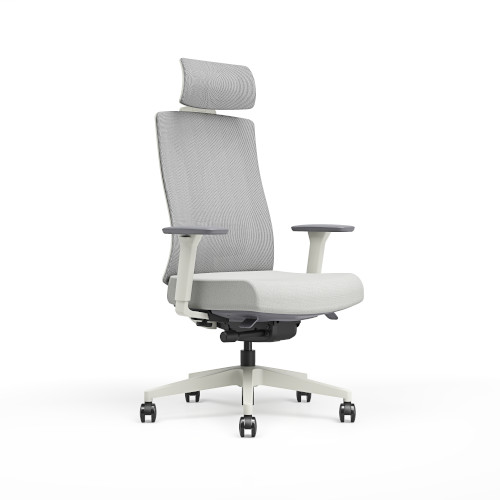 Most Popular
PostureX Office Chair
- Seat height
- Adjustable
- Seat depth
- Yes, seat slide
- Lumbar support
- Adjustable for height and depth
- Armrests
- 3D, with width adjuster
- Tilt
- 4 position recline lock with tension control
- Headrest
- Optional, headrest and non headrest versions
- Max user weight
- 120kg
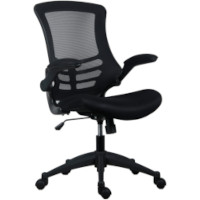
Executive High Back Mesh Chair
- Seat height
- Adjustable, 450 to 550mm
- Seat depth
- No seat slide
- Lumbar support
- Built in, not adjustable
- Armrests
- Folding, not 3D
- Tilt
- Tilt with tension control
- Headrest
- No
- Max user weight
- 114kg
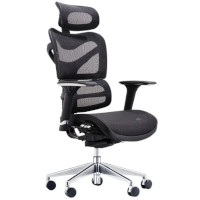
Dorsum Executive Mesh Chair
- Seat height
- Adjustable, 480 to 565mm
- Seat depth
- Yes, 430 to 480mm slide
- Lumbar support
- Adjustable
- Armrests
- 3D, multifunctional
- Tilt
- Dual pivot with adjustable tension
- Headrest
- Yes, adjustable, fitted as standard
- Max user weight
- 149kg
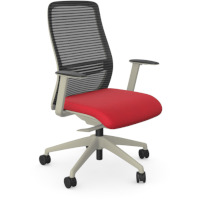
NV Posture Chair
- Seat height
- Adjustable, 475 to 585mm
- Seat depth
- Yes, 410 to 485mm slide
- Lumbar support
- Adjustable
- Armrests
- Height adjustable, not full 3D
- Tilt
- 4 position recline lock
- Headrest
- Optional, headrest version sold separately
- Max user weight
- 110kg
PostureX is the only one of the four that offers every adjustment covered in this guide. The Executive High Back is the simplest and priced accordingly, so it suits shorter sitting periods and occasional-use desks. Dorsum matches PostureX closely on specification and is the stronger choice where user weight is the deciding factor. NV covers seat height, seat slide and lumbar support, which are the three that matter most for a full desk day.
How HuntOffice can help
Every adjustment above is standard on our own PostureX range. Our Chair Lab showrooms let you feel the difference between a correctly adjusted chair and a factory default one before you buy. If your team already has the chairs but hasn't had them set up properly, our chair adjustment training covers exactly this in person, on the chairs you actually own.